QUICK START
- WEAR your Hooked Fishing HUD
- CLICK the Fishing Pole!
- WATCH the Big Bobber!
- When the Big Bobber turns into a LITTLE BOBBER – CLICK IT TO REEL IN!
- Your catch will show in Local Chat!
- WELCOME TO HOOKED!
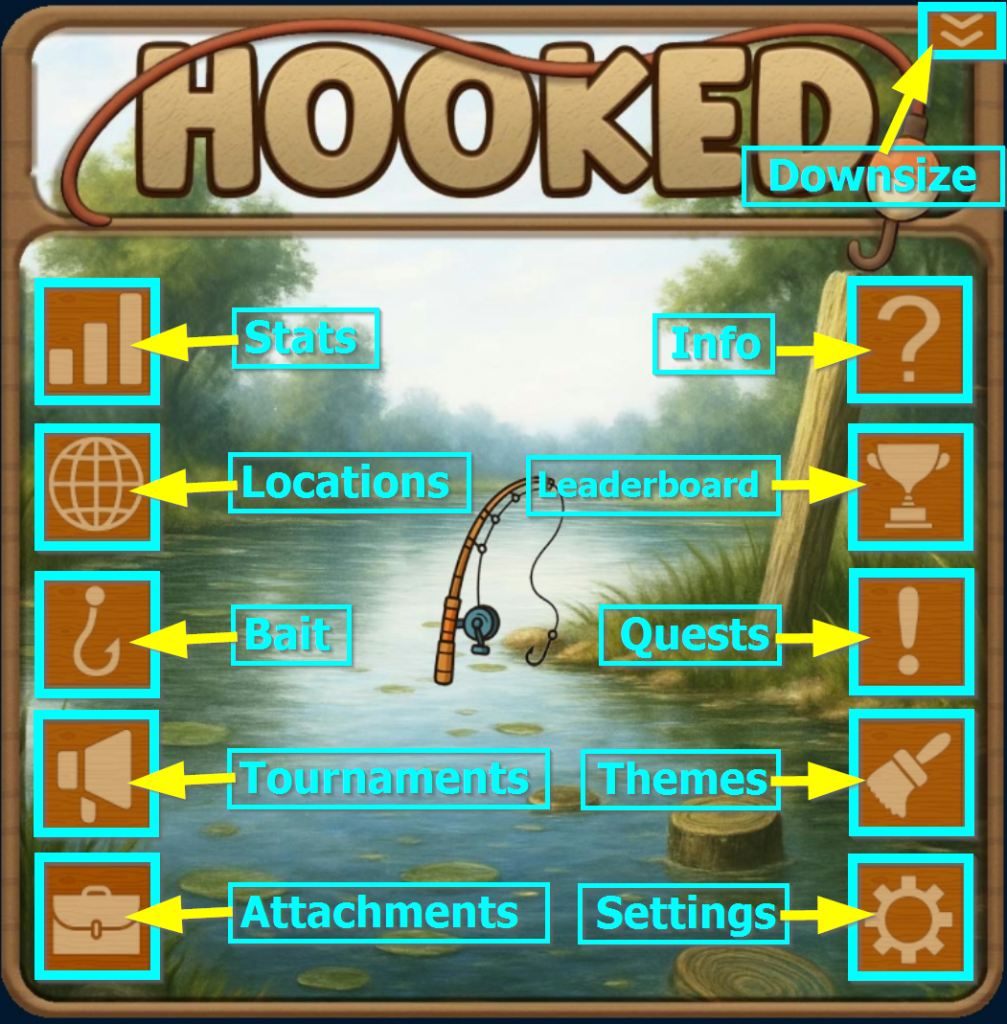
THE BUTTONS
STATS
The Stats button shows your full fishing progress at a glance. You’ll see your current Level and XP, how many Fish Points, Junk Points, and Scrap Points you’ve earned, plus details about your current location and its bonus. It also tracks your personal best catch, total weight caught, and a list of your most recent catches, so you always know how you’re doing and what you’ve reeled in lately.
LOCATIONS
The Locations button lets you choose where you fish. Each location has its own theme, fish pool, junk pool, and special bonus that affects what you catch. New locations unlock as you level up, and you must meet the required level to access them. Some locations also have Location Unlock items, which grant access once you’ve reached the correct level. Once unlocked, a location stays available permanently.
BAIT
The Bait button is where you manage everything related to bait. Your Tacklebox shows all bait you own and lets you equip what you want to fish with — each cast consumes one bait. The Buy Bait option lets you purchase more using Lindens – from anywhere! No need to visit a terminal or store to refill! As you continue fishing and leveling up, new bait types unlock, giving you access to different fish pools and better results at higher locations.
TOURNAMENTS
The Tournaments button gives you access to active fishing tournaments. When the button is blinking, a tournament is currently running and ready to join. Inside, you can view tournament details, join events, and track your performance while competing against other anglers. Tournaments reward skill, timing, and dedication, with special prizes and bragging rights for top performers.
ACCESSORIES
The Accessories button shows all wearable Hooked items you currently have active. Accessories provide passive bonuses—such as improved bite chance, higher rarity rolls, or better junk finds—that apply automatically while you fish. You can wear multiple accessories at once, and their bonuses stack as long as they’re active. This makes accessories a powerful way to fine-tune your fishing strategy and boost your results.
INFO
The Info button provides helpful game information and quick links. From here, you can learn how Hooked works, check tips and explanations for game systems, and access official resources like the website and support pages. It’s the go-to spot if you’re unsure about something or want a refresher while you’re playing.
LEADERBOARDS
The Leaderboards button shows fishing rankings by location as well as worldwide. You can view the top anglers for your current fishing spot and see how you compare globally across all locations. Leaderboards update regularly and are used for tournaments and leagues, making them a great way to track progress, compete with others, and chase the top spots.
QUESTS
The Quests button shows your active fishing challenges. Each location has its own set of quests, encouraging you to explore different areas and play in new ways. Completing quests rewards XP, Fish Points, and special unlocks, and helps you progress faster as you fish. New quests become available as you unlock and visit new locations.
THEMES
The Themes button lets you customize the look of your HUD. As you complete location-specific quests, you unlock special themes tied to those locations. Themes can be set to static, where one theme is always used, or Travel Mode, which automatically switches your HUD background to match each location you visit. It’s a fun way to personalize your experience and show off your progress.
SETTINGS
The Settings button lets you control how your HUD behaves. From here, you can reset the HUD if something gets stuck, toggle sound effects on or off, and turn tournament announcements on or off. These options let you fine-tune your experience without affecting your progress or stats.